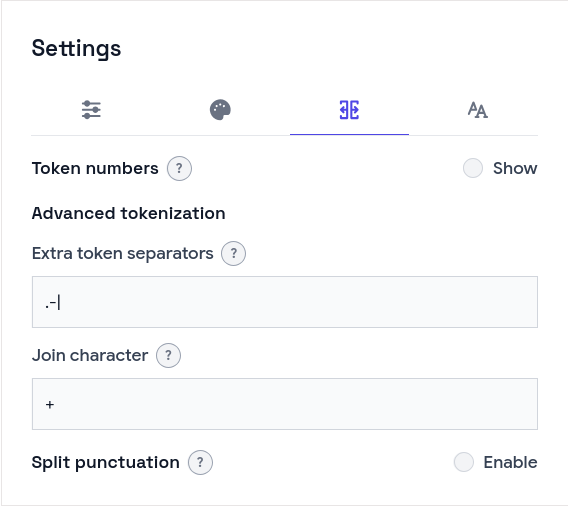
In Word-by-word Aligner every word is a box you can click and link to its translation. Turning a line of text into those boxes is tokenization, and it is the step where a quick solution falls apart fast.
The obvious version is text.split(' '). It breaks on the first real sentence. “world!” arrives with the exclamation mark glued on. “don’t” either stays whole or loses its apostrophe, depending on how you strip punctuation. A fixed phrase like “New York” splits into two boxes when it should be one. And someone working with a compound, or a script they segment differently, has no way to tell the tool what counts as a word. We hit all four of these, so the tokenizer grew into a small function with a few options rather than a one-liner.
What a token is
A token is text plus one flag:
export interface Token {
  id: TokenId;
  text: string;
  /** No visible space before this token in preview/editor rows. */
  joinLeft?: boolean;
}
The joinLeft flag decides spacing. A normal word renders with a space before it. Punctuation and the pieces of a split compound render tight against the word on their left. One boolean carries that, so the row layout stays simple.
Two passes: split, then handle punctuation
The main loop walks the string once. Whitespace ends the current word. A configured split character also ends it and marks the next piece as joined to the left. Everything else accumulates:
for (const ch of cleaned) {
  if (/\s/u.test(ch)) {
    pushSegment();
    continue;
  }
  if (splitSet.has(ch)) {
    pushSegment();
    nextJoinLeft = true;
    continue;
  }
  cur += ch;
}
pushSegment();
Each segment then goes through a second pass for punctuation, because punctuation rules differ from word-boundary rules. Keeping the two apart is what keeps each pass readable.
The apostrophe problem
Punctuation splitting is where contractions get hurt. Strip every punctuation mark and “don’t” becomes “don” and “t”. The rule that fixes it is narrow: an apostrophe stays inside the word when it sits between two letters.
function apostropheBetweenLetters(ch, prev, next): boolean {
  return Boolean(
    (ch === "'" || ch === '’') && prev && next && /\p{L}/u.test(prev) && /\p{L}/u.test(next)
  );
}

function shouldSplitPunctuation(ch, prev, next, punctuationSplitSet): boolean {
  const isPunct = punctuationSplitSet ? punctuationSplitSet.has(ch) : PUNCT_CLASS.test(ch);
  if (!isPunct) return false;
  if (apostropheBetweenLetters(ch, prev, next)) return false;
  return true;
}
Both the straight and curly apostrophe count, and both surrounding letters are checked with the Unicode letter class \p{L}, so the rule holds across scripts rather than English alone. “don’t” stays one token; “world!” becomes “world” and a tight “!”.
By default, punctuation splitting uses the Unicode punctuation class \p{P}. Anyone who wants finer control can pass an explicit set of characters instead, and only those split.
Fixed phrases as one box
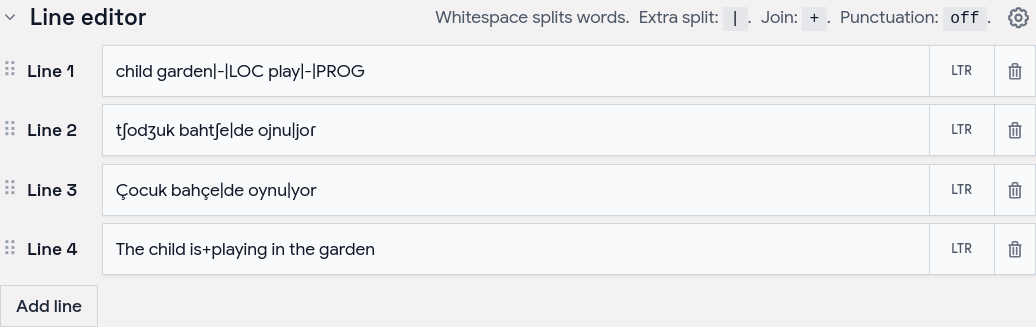
The reverse problem is two written words that should align as one unit. A merge character handles it. Someone types the unit with a join marker, and the tokenizer turns the marker back into a space inside a single token:
function expandMerge(segment: string, mergeChar: string): string {
  if (!mergeChar || !segment.includes(mergeChar)) return segment;
  return segment.split(mergeChar).join(' ');
}
With + as the merge character, “New+York” becomes one box reading “New York” that links as a single word. The same option, read the other way, lets a split character break a compound like “mother-in-law” into separate boxes that still sit tight together.
Keeping token ids stable across edits
There is a trap that only shows up once links exist. A connection stores the ids of the two words it joins. Re-tokenizing runs on every keystroke, and the first version handed out fresh ids each time, which silently broke existing links on every edit.
The fix is to reconcile the new tokens against the old ones by position and reuse the id when a slot is still there:
export function reconcile(prev, nextTokens, lineId): Token[] {
  return nextTokens.map((next, i) => {
    const old = prev[i];
    if (old) return { ...old, text: next.text, joinLeft: next.joinLeft };
    return { id: `${lineId}-${i}`, text: next.text, joinLeft: next.joinLeft };
  });
}
Editing a word keeps its id, so its links hold. Adding or removing words shifts the ids after the change, and the app prunes any connection that no longer points at a real pair. The result is that typing in the middle of a line does not wipe the work above it.
Takeaways
Tokenization looks trivial until punctuation, contractions, and fixed phrases show up at once. A few options covered almost every case: split characters, a merge marker, and a punctuation mode with one exception for apostrophes between letters. Whatever ends up splitting the text, the id stability is the part we would not skip again, since it is what lets anything attached to a token survive an edit.
Word-by-word Aligner is free and runs in the browser at aligner.tinygods.dev. The code is open source (MIT) at github.com/tinygodsdev/bitext-word-alignment; the tokenizer lives in src/lib/domain/tokens.ts.