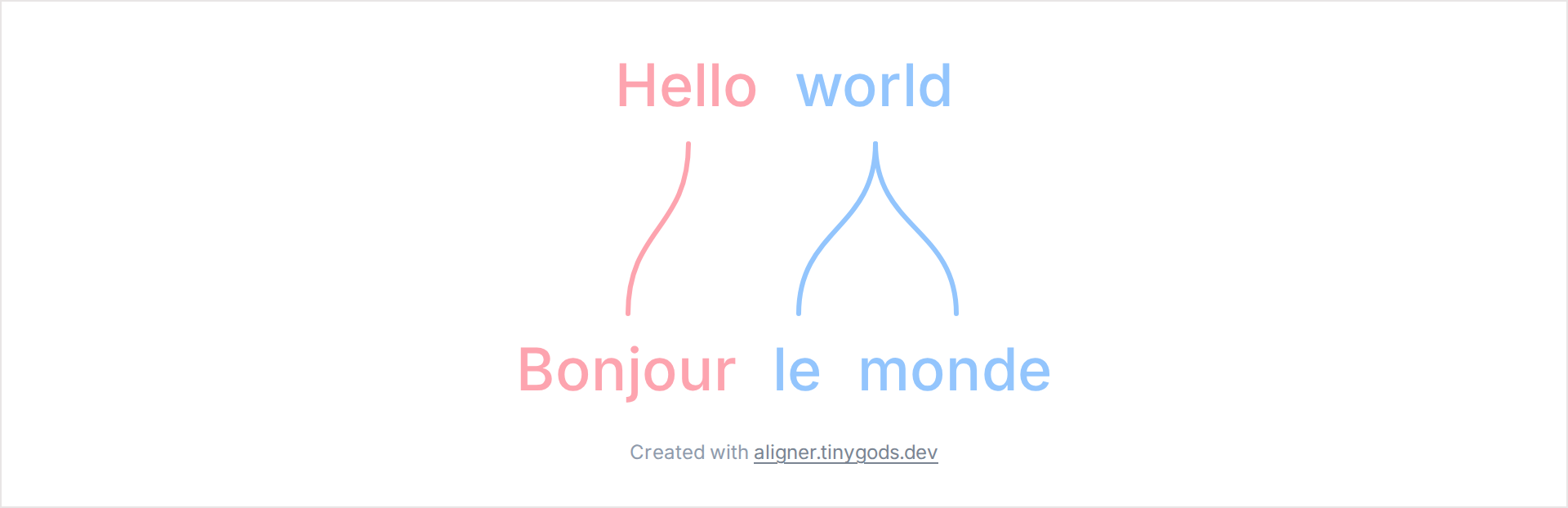
While building Word-by-word Aligner, we hit a layout problem worth writing down. The tool stacks a sentence over its translation and draws curved lines from each word to its match on the line below. The text is ordinary HTML, so the browser wraps it, resizes it, and picks line breaks on its own. The connectors have to find those words and stay attached to them through all of that.
The naive approach is to position the lines manually and recompute everything by hand, which means fighting the browser at every turn. The approach that worked leans on the browser for layout and adds a single measurement step on top.
Text and lines in separate layers
The words render as plain HTML in flex rows, one row per line of text. The connectors live in a separate SVG layer positioned over the same box. The SVG has no idea where any word sits, so the first step is to ask the DOM.
Each word box carries a data-token-id. After the browser lays the text out, those boxes are walked, each rectangle is read with getBoundingClientRect, and it is converted to coordinates relative to the container:
rootEl.querySelectorAll<HTMLElement>('.token-row [data-token-id]').forEach((el) => {
  const id = el.dataset.tokenId;
  if (!id) return;
  const b = el.getBoundingClientRect();
  const x = b.left - ro.left;
  const y = b.top - ro.top;
  tokenLayout[id] = {
    cx: x + b.width / 2,
    cy: y + b.height / 2,
    x, y, w: b.width, h: b.height
  };
});
The query is scoped to .token-row for a reason. Other parts of the editor (a settings popover, for one) mount inside the same root and can reuse data-token-id. Without the scope, their boxes would overwrite the real word positions.
Anchoring the curve outside the boxes
With every word reduced to a center and a rectangle, a connector becomes two points and a path between them. The endpoints sit a few pixels outside the box, so a stroke never clips a descender or a tall letter. The function also checks which word is visually higher, since stacked rows can be reordered:
const PAD = 8;

export function linkEndpoints(pUpper: TokenLayout, pLower: TokenLayout) {
  const upperIsAbove = pUpper.cy <= pLower.cy;
  if (upperIsAbove) {
    return { x1: pUpper.cx, y1: pUpper.y + pUpper.h + PAD, x2: pLower.cx, y2: pLower.y - PAD };
  }
  return { x1: pUpper.cx, y1: pUpper.y - PAD, x2: pLower.cx, y2: pLower.y + pLower.h + PAD };
}
The curve itself is a cubic Bezier with both control points placed on the horizontal midline between the two words. That makes the line leave one word vertically and arrive at the other vertically, no matter how far apart they are horizontally:
export function linkPathD(x1: number, y1: number, x2: number, y2: number, style: 'straight' | 'curved') {
  if (style === 'straight') return `M ${x1} ${y1} L ${x2} ${y2}`;
  const ym = (y1 + y2) / 2;
  return `M ${x1} ${y1} C ${x1} ${ym} ${x2} ${ym} ${x2} ${y2}`;
}
Remeasuring when the layout moves
A single measurement holds only until the layout shifts. Three things move it: resizing the container changes where words wrap, a web font finishing its load changes word widths, and editing text adds or removes boxes. Each one needs a fresh measurement.
A ResizeObserver covers size changes. The document.fonts API covers font loads, through both the ready promise and the loadingdone event. The measurement runs again on any of them:
const ro = new ResizeObserver(() => remeasure());
ro.observe(rootEl);
remeasure();

if (browser && document.fonts) {
  void document.fonts.ready.then(() => { if (!cancelled) remeasure(); });
  document.fonts.addEventListener('loadingdone', remeasure);
}
The remeasure step is where a subtle bug hid. Reading positions in the same frame as a layout change gives stale numbers, because the browser has not applied the reflow yet. Waiting two animation frames lets layout settle before measuring:
function remeasure() {
  requestAnimationFrame(() => {
    requestAnimationFrame(() => measure());
  });
}
One frame is often enough. The second frame covers the cases where it is not, and the cost is a few milliseconds the eye never sees.
Why connectors cross
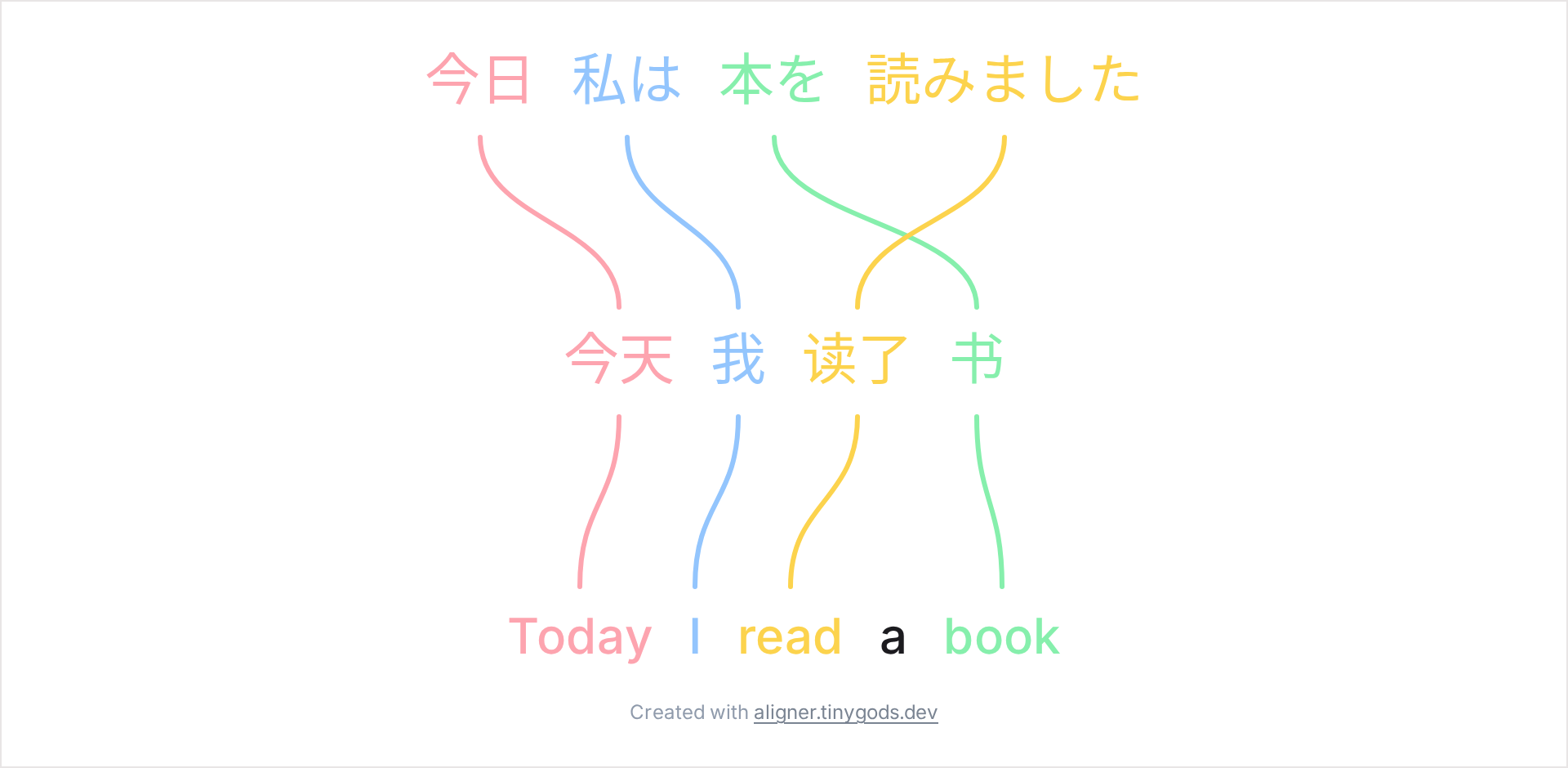
Translations reorder words. A subject at the front of an English sentence can map to a word near the end of its Japanese translation, and the connector for it crosses the others. The tool draws those crossings exactly where they fall. They show the reordering, which is the thing a reader of an alignment wants to see.
The linking interaction
Creating a link is two clicks: pin a word, then click its match on a neighboring line. The model stays small because of one rule. A link forms only between vertically adjacent lines. With a source line, a gloss, and an IPA row stacked together, a click across two non-adjacent rows would run a connector straight through the row between them, so the tool repins instead and shows a hint:
const ia = lineIds.indexOf(cur.lineId);
const ib = lineIds.indexOf(lineId);
if (ia < 0 || ib < 0 || Math.abs(ia - ib) !== 1) {
  this.adjacencyHint = true;
  this.pending = { lineId, tokenId };
  return;
}
Takeaways
The pattern generalizes past this one tool, which is why it was worth writing up. When something has to draw over flowing text, the move that worked was to let the browser own the layout and treat the overlay as a function of measured positions. Those positions are read after layout settles rather than during it, and the events that move them are worth watching: size and fonts at least, plus whatever edits the app itself allows.
Word-by-word Aligner is free and runs in the browser at aligner.tinygods.dev. The code is open source (MIT) at github.com/tinygodsdev/bitext-word-alignment; the geometry shown here lives in src/lib/domain/link-geometry.ts and src/lib/components/preview/AlignmentSvg.svelte.